Continuous Integration (CI) Testing
Important
All CI checks must pass before a pull request can be merged.
The status (running and pass/fail) for all checks can be viewed by clicking the appropriate link in the checks section of a GitHub pull request.
The RAJA project uses two CI tools to run tests:
GitHub Actions runs builds and tests for Linux, Windows, and MacOS environments using compilers in container images maintained in the RADIUSS Docker Project. While we do some GPU builds on GitHub Actions for CUDA, HIP, and SYCL, RAJA tests are only run for CPU-only builds. The current set of builds run on GitHub Actions can be seen by looking at the
RAJA/.github/workflows/build.ymlfile. TheRAJA/Dockerfilefile contains the CMake options used to generate the build environment for each of the builds.GitLab instance in the Collaboration Zone (CZ) of the Livermore Computing (LC) Center runs builds and tests on LC platforms using software stacks (compilers, etc.) important to many RAJA user applications. GitLab build configurations are more complex than GitHub Actions; they will be described in detail in GitLab CI.
These tools integrate with the RAJA GitHub project and automatically run RAJA builds and tests when a PR is created and when changes are pushed to a PR branch or one of our protected branches main and develop.
The following sections describe basic elements of the operation of the CI tools.
GitLab CI
The GitLab CI instance used by the RAJA project lives in the Livermore Computing (LC) Collaboration Zone (CZ). It runs builds and tests using machine and compiler environments important to RAJA user applications at LLNL.
Constraints
LC security policies constrain how projects can run GitLab CI on LC platforms. Specifically, policies require that all members of a GitHub project be members of the LLNL GitHub organization and have two-factor authentication enabled on their GitHub accounts. When these requirements are satisfied, GitLab on the LC CZ can mirror a GitHub project and trigger GitLab CI when changes are made to the GitHub repo. If the requirements are not met, LC GitLab CI checks will not run. This implies, for example, that GitLab CI will not run an LLNL organization project for a PR made from a fork of the project repo by someone not in the LLNL organization.
For a compliant LLNL GitHub project like RAJA, auto-mirroring of the GitHub repo to LC GitLab is done every 30 minutes or so, triggering builds and tests on new changes pushed to the RAJA GitHub project. If you have access to LC platforms, you can learn more about LC GitLab mirroring.
Important
GitLab CI will not run for a PR branch on a fork of the RAJA repo. The RAJA project manually manages contributions made on forks of the RAJA repo using the procedure described in Contributing to RAJA.
GitLab CI (LC) Testing Workflow
The figure below shows the sequence of steps in the RAJA GitLab CI testing process. More details about these steps will appear in the in later sections:
A mirror of the RAJA GitHub repo is updated in the RAJA LC CZ GitLab project automatically (approximately every 30 minutes).
Note
There may be a delay in the mirroring, since it is not synchronous with changes to the RAJA GitHub project.
GitLab launches CI test pipelines for any new changes made to the
developormainbranches or any non-fork PR branch. While running, the execution and pass/fail status may be viewed and monitored in the GitLab CI GUI or in the RAJA GitHub project checks section of a PR.For each platform and compiler combination, Spack builds RAJA dependencies and generates a configuration in the form of a CMake cache file, or host-config file.
A host-config file is passed to CMake, which configures a RAJA build space. Then, RAJA and its tests are compiled.
Next, the RAJA tests are run.
When test pipelines complete, results are reported to GitLab.
Lastly, GitLab reports to GitHub indicating the status of checks there.
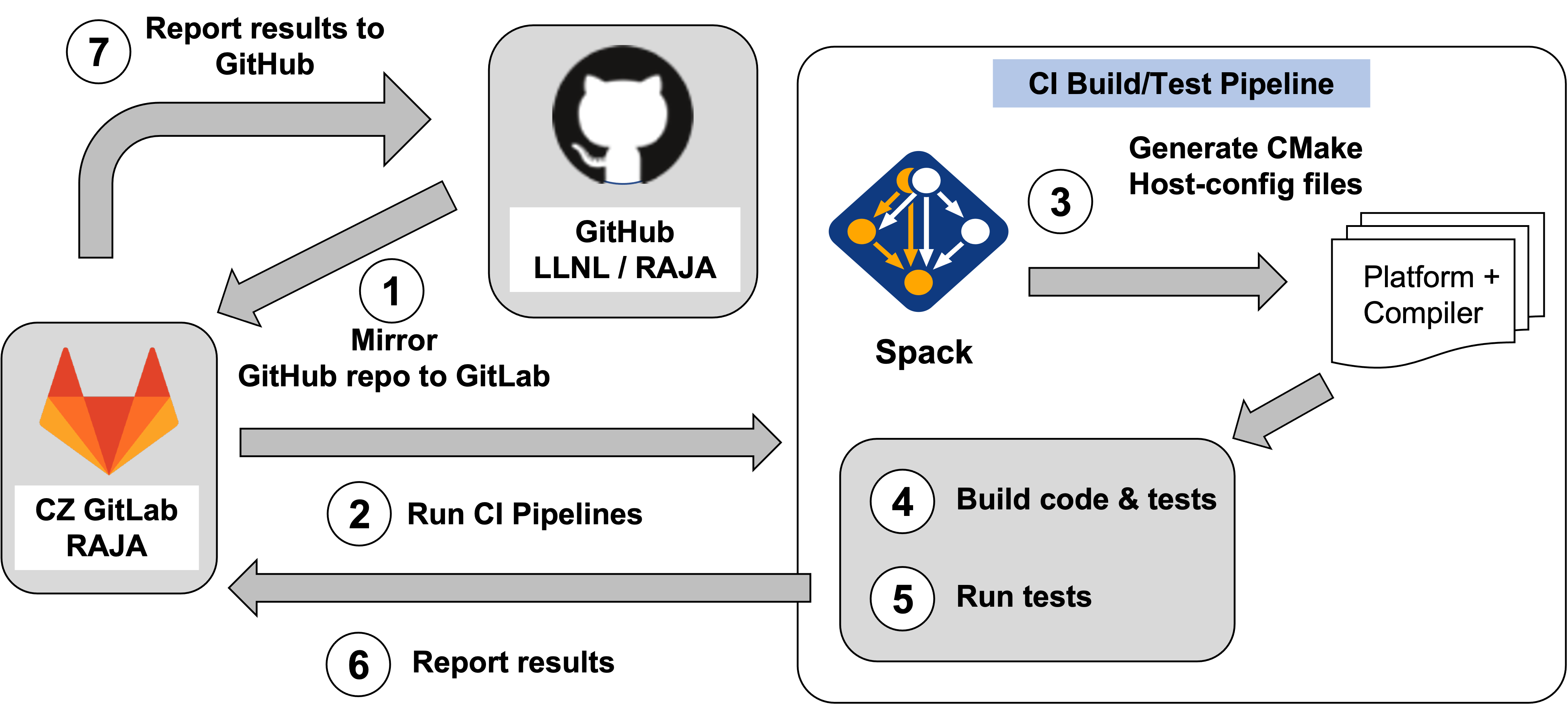
The main steps in the RAJA GitLab CI testing workflow are shown in the figure. This process is triggered when a developer makes a PR on the GitHub project or whenever changes are pushed to the source branch of a PR.
Next, we describe the roles that external projects and files in the RAJA repo play in the RAJA GitLab CI workflow.
GitLab CI Testing Dependencies (specific to LC CZ)
RAJA GitLab CI testing depends on several other projects that we develop collaboratively with other projects. These include
RADIUSS Shared CI, a centralized framework for software testing with GitLab CI on LC machines. The project is developed on GitHub and is mirrored to the LC CZ GitLab instance. As of v2025.12.0, RADIUSS Shared CI provides reusable GitLab CI Components (requires GitLab 17.0+).
Spack, a multi-platform package manager that builds and installs HPC software stacks.
Uberenv, a Python script that helps to simplify the workflow of Spack and other tools for building third-party dependencies. Uberenv is a submodule in RAJA that lives in
RAJA/scripts/uberenv/.RADIUSS Spack Configs, a collection of Spack compiler and package configurations used by Spack to generate build configurations. The build configurations are specific to LLNL LC platforms. Spack packages for multiple projects are maintained in this project. Shared RADIUSS CI jobs are also hosted by this project as they relate to the Spack configuration. RADIUSS Spack Configs is a submodule in RAJA that lives in
RAJA/scripts/radiuss-spack-configs/.
The relationships among these dependencies in a project that uses them is described in the RADIUSS Shared CI User Guide along with information about how the framework works and how to set up a project to use it.
Note
For detailed information about the GitLab CI Components architecture and migration from the traditional include-based configuration, see the RADIUSS Shared CI Components Migration Guide.
Important
The RAJA Spack package is maintained in the RADIUSS Spack Configs project. After packages are updated there, they are pushed to the Spack repo on GitHub via a pull request.
The remainder of this section describes files in the RAJA repo that are used to configure and customize the shared CI framework specifically for the RAJA project.
GitLab CI Testing Files (specific to LC CZ)
The following figure shows directories and files in the RAJA project that support LC GitLab CI testing.
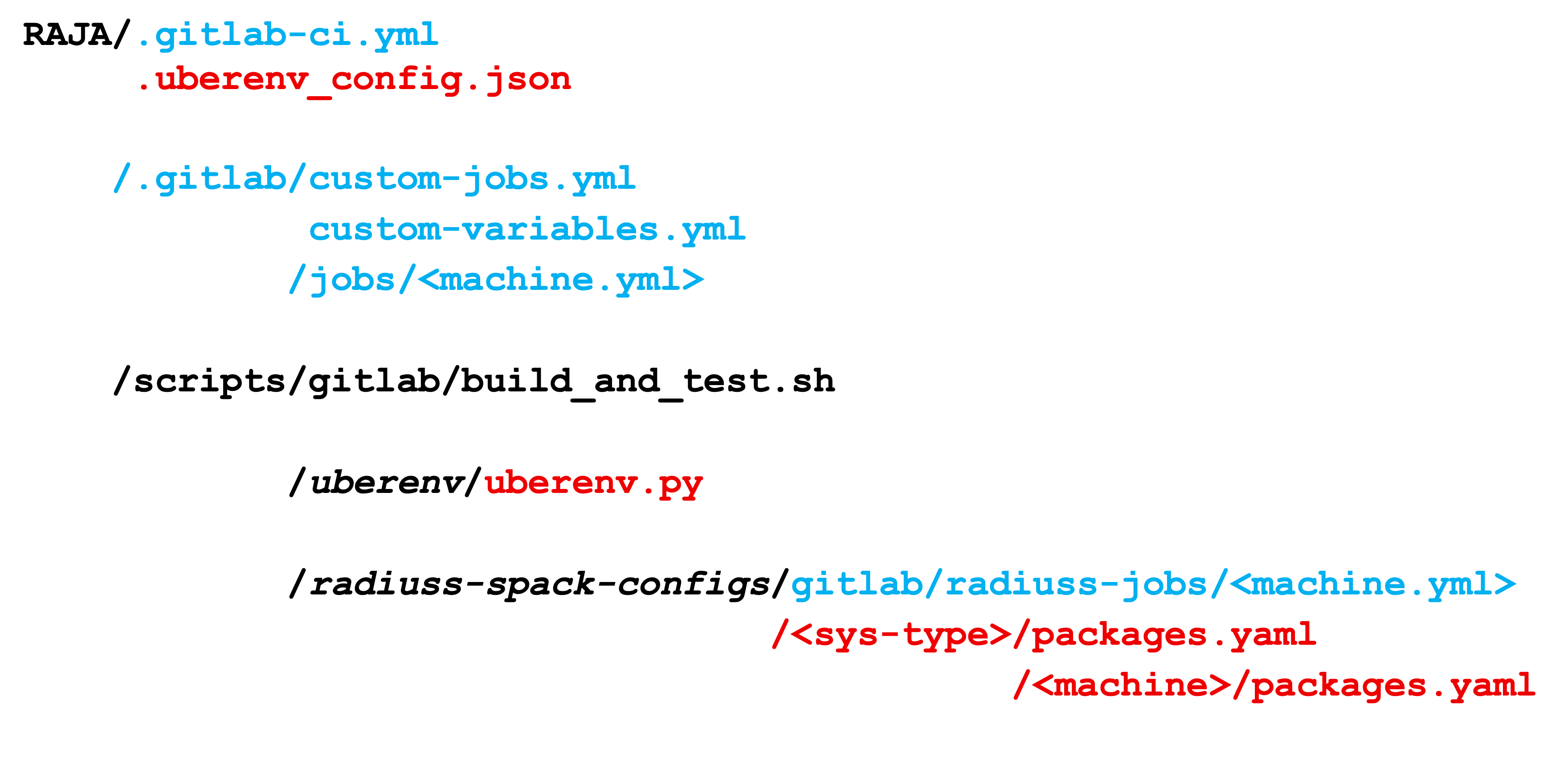
The figure shows directories and files in the RAJA repo that support GitLab
CI testing. Files in blue are specific to CI while those in red relate
to the build (Spack) environment description. The build_and_test.sh
scripts drives the configuration, compilation, and testing processes in
GitLab. uberenv and radiuss-spack-configs are both Git submodules
that are shared and maintained with other projects.
Briefly, these files play the following roles in GitLab CI testing:
The RAJA/.gitlab-ci.yml file is the top-level file for GitLab CI configuration. It uses GitLab CI Components (requires GitLab 17.0+) from the RADIUSS Shared CI project. It defines variables used throughout the CI configuration such as GitHub project name and organization, service user account name, and includes components for machine-specific pipelines and utilities.
The RAJA/.uberenv_config.json file defines information about Spack such as Spack version we are using, location of Spack packages, etc.
The RAJA/.gitlab directory contains RAJA-specific CI configuration files:
.gitlab/custom-jobs.yml- Job templates for child pipelines, created and customized by the project based on templates from RADIUSS Shared CI.
.gitlab/custom-variables.yml- Machine-specific allocation variables and build configurations, created and customized by the project based on templates from RADIUSS Shared CI.The RAJA/.gitlab/jobs directory contains files defining RAJA specific jobs per machine. These files are appended to the list of shared CI jobs provided by RADIUSS Spack Configs. Each job ultimately corresponds to one Spack spec.
The RAJA/scripts/gitlab/build_and_test.sh script contains commands that are run during the RAJA build and test process. It is set in the CI using the
JOB_CMDvariable.
In the following sections, we discuss how these files are used in the steps of the RAJA GitLab CI testing process summarized above.
Launching CI pipelines (step 2)
In step 2 of the diagram above, GitLab launches RAJA test pipelines
starting with the content of the RAJA/.gitlab-ci.yml file described above.
This file includes GitLab CI Components directly from the RADIUSS Shared CI
project using the syntax
component: $CI_SERVER_FQDN/radiuss/radiuss-shared-ci/<component-name>@<version>.
The available components include:
base-pipeline- Provides core templates for machine availability checks and pipeline orchestration
utility-draft-pr-filter- Filters out draft pull requestsMachine-specific pipeline components (
dane-pipeline,matrix-pipeline,corona-pipeline,tioga-pipeline,tuolumne-pipeline,lassen-pipeline) - Define the build and test workflows for each machine
Note
Component Versioning: Components are versioned using the
@<version> syntax (e.g., @v2025.12.0). RAJA currently uses
@v2025.12.0. When updating to a new version of RADIUSS Shared CI
components, all component references in .gitlab-ci.yml should be
updated to use the same version to ensure consistency. Version numbers
follow the v<YEAR>.<MONTH>.<PATCH> format.
Machine pipelines are defined inline in the .gitlab-ci.yml file using
trigger syntax with component includes. Each project creates and customizes
.gitlab/custom-variables.yml locally (based on templates from RADIUSS
Shared CI) to define allocation settings for each machine, and
.gitlab/custom-jobs.yml to define job-specific templates and behaviors.
Component Inputs
Components accept inputs that configure their behavior. The main inputs used are:
- Base Pipeline Component:
github_project_name- The GitHub project name (e.g., “RAJA”)github_project_org- The GitHub organization (e.g., “LLNL”)github_token- Token for GitHub API access (typically$GITHUB_TOKEN)
- Draft PR Filter Component:
github_token,github_project_name,github_project_org- Same as abovealways_run_pattern- Regex pattern for branches that should always run (e.g.,"^develop$|^main$|^v[0-9.]*-RC$")
- Machine Pipeline Components (dane, matrix, corona, tioga, tuolumne, lassen):
job_cmd- The command to run for each job (e.g.,"./scripts/gitlab/build_and_test.sh")shared_alloc- Scheduler allocation for the shared allocation job (e.g.,"--exclusive --time=120 --nodes=1"for SLURM)job_alloc- Scheduler allocation for individual jobs within the shared allocation (e.g.,"--nodes=1"for SLURM)github_project_name,github_project_org- For status reporting
Allocation settings are defined in .gitlab/custom-variables.yml and vary by
machine and scheduler type (SLURM for dane/matrix, flux for corona/tioga/tuolumne,
LSF for lassen). For example:
# Dane (SLURM) allocation settings
DANE_SHARED_ALLOC: "--exclusive --reservation=ci --time=120 --nodes=1"
DANE_JOB_ALLOC: "--reservation=ci --nodes=1"
Each job that is run is defined by a Spack spec in one of two places, depending
on whether it is shared with other projects or it is specific to RAJA. The
shared jobs are defined in files located in
gitlab/radiuss-jobs/<MACHINE>.yml in the RADIUSS Spack Configs Project. Overrides (modifications)
of those jobs and other RAJA-specific jobs are defined in
RAJA/.gitlab/jobs/<MACHINE>.yml files.
Each shared job will be run as-is unless it is overridden in the RAJA local
jobs file for the corresponding machine. For example, a shared job for the LC
dane machine may appear in the RADIUSS Spack Configs file
gitlab/radiuss-jobs/dane.yml as:
gcc_8_1_0:
  variables:
    SPEC: "${PROJECT_DANE_VARIANTS} %gcc@8.1.0 ${PROJECT_DANE_DEPS}"
  extends: .job_on_dane
and then may be overridden in the RAJA/.gitlab/jobs/dane.yml
file as:
gcc_8_1_0:
  variables:
    SPEC: " ${PROJECT_DANE_VARIANTS} %gcc@8.1.0 ${PROJECT_DANE_DEPS}"
    DANE_JOB_ALLOC: "--time=60 --nodes=1"
  extends: .job_on_dane
In this example, the Spack build spec is the same, but the job is configured with a specific timeout limit and number of nodes appropriate for RAJA testing.
Important
A shared job override must use the same job label as the shared job defined in the RADIUSS Shared CI project.
RAJA-specific jobs whose configurations are not shared with other projects are
also defined in the RAJA/.gitlab/jobs/<MACHINE>.yml files. For example:
clang_10_0_1_gcc_8_3_1_desul_atomics:
  variables:
    SPEC: " ~shared +openmp +tests +desul %clang@10.0.1 cxxflags=--gcc-toolchain=/usr/tce/packages/gcc/gcc-8.3.1 cflags=--gcc-toolchain=/usr/tce/packages/gcc/gcc-8.3.1"
  extends: .job_on_dane
defines a RAJA job with desul atomics enabled to be run on the dane machine.
Important
Each base compiler configuration that is used in GitLab CI testing must have a Spack spec defined for it in the appropriate file for the machine that it will be tested on in the RADIUSS Spack Configs project.
Running a CI build and test pipeline (steps 3, 4, 5, 6)
The RAJA/scripts/gitlab/build_and_test.sh file defines the steps executed for each build and test pipeline as well as information that will appear in the log output for each step. The script “echoes” information to the test logs indicating what it is doing. Following the echo commands in the file may help one understand the workflow.
The details of the various steps in the process may change from time to time. However, the basic sequence is:
Perform some basic (platform-independent) setup.
Invoke the
RAJA/scripts/uberenv/uberenv.pyPython script that drives Spack to generate a host-config file from a given spec (step 3).Run CMake to configure a build space passing the host-config file to it which contains all CMake variable settings for the configuration.
Build RAJA and tests (step 4).
Run RAJA tests via ctest (step 5).
Export XML test reports for reporting in GitLab (step 6), which is done by the RADIUSS Shared CI Framework.
Perform clean up tasks.
Recall that RAJA project specific settings defining the Spack version to use, locations of Spack packages, etc. are located in the RAJA/.uberenv_config.json file.
Also, recall that to generate a host-config file, Spack uses packages and specs in the RADIUSS Spack Configs project (a RAJA submodule), plus RAJA-specific specs defined in files in the RAJA/.gitlab/jobs directory, as described earlier.
GitHub Actions CI
We use GitHub Actions to run builds and tests for Linux, Windows, and MacOS environments. We use this tool to run Linux builds and tests for various less-common configurations, such as compiler versions that are not available on LC systems. While we do builds for CUDA, HIP, and SYCL RAJA GPU back-ends in the GitHub Actions Linux environment, RAJA tests are only run for CPU-only pipelines.
Note
GitHub Actions CI test jobs are run on every RAJA pull request, regardless of whether it was made from a branch in the RAJA project repo or from a fork of the repo.
GitHub Actions Testing Workflow
The jobs run in the GitHub Actions testing workflow for RAJA are specified in
the RAJA/.github/workflows/build.yml file. This file defines the job steps, commands,
compilers, etc. for each OS environment in the associated jobs: section.
A summary of the configurations we build are:
Windows. The
build_windows:Windows section contains information for the Windows test builds. For example, we build and test RAJA as a static and shared library. This is indicated in the Windowsstrategysection:strategy: matrix: shared: - args: BUILD_SHARED_LIBS=On CMAKE_WINDOWS_EXPORT_ALL_SYMBOLS=On - args: BUILD_SHARED_LIBS=OffWe use the Windows/compiler image provided by the GitHub Actions application indicated by:
runs-on: windows-latestMacOS. The
build_mac:section contains information for Mac test builds. We use the MacOS/compiler image provided by the GitHub Actions application indicated by:runs-on: macos-latestLinux. The
build_docker:section contains information for Linux test builds. We build and test RAJA using Docker container images maintained in the RADIUSS Docker project on GitHub. The builds we do at any point in time are located in thestrategyblock, for example:strategy: matrix: target: [gcc12_debug, gcc13, clang13, clang15, rocm5.6, rocm5.6_desul, intel2024, intel2024_debug, intel2024_sycl]The Linux OS image used is indicated by:
runs-on: ubuntu-latest
Docker Builds
For each Linux/Docker pipeline, the base container images, CMake, build, and test commands are located in RAJA/Dockerfile.
The base container images are built and maintained in the RADIUSS Docker project. These images are rebuilt regularly ensuring that we have the most up to date builds of each container and compiler.
Note
Please see Reproducing Docker Builds Locally for more information about reproducing Docker builds locally for debugging purposes.